



25 Mar Google Merchant Center: The Engine Behind High-Performing Google Ads
Key Takeaways
- Google Merchant Center is the product data engine powering Google Shopping, Performance Max, and Demand Gen campaigns—your ads are only as strong as your product feed
- Most underperforming Shopping and Performance Max accounts in 2024–2026 are limited by weak product feeds (poor titles, missing attributes, policy issues), not bids or budgets
- Optimised product titles, images, categories, and custom labels directly improve CTR, CPC efficiency, and conversion rates across all Google Ads campaign types
- GMC setup is a one-time project, but feed optimisation requires ongoing monthly reviews to maintain competitive performance
- Before scaling ad spend, audit your existing Merchant Center feed—prioritise title optimisation, GTIN coverage, and diagnostics clean-up
What Is Google Merchant Center and Why It Matters
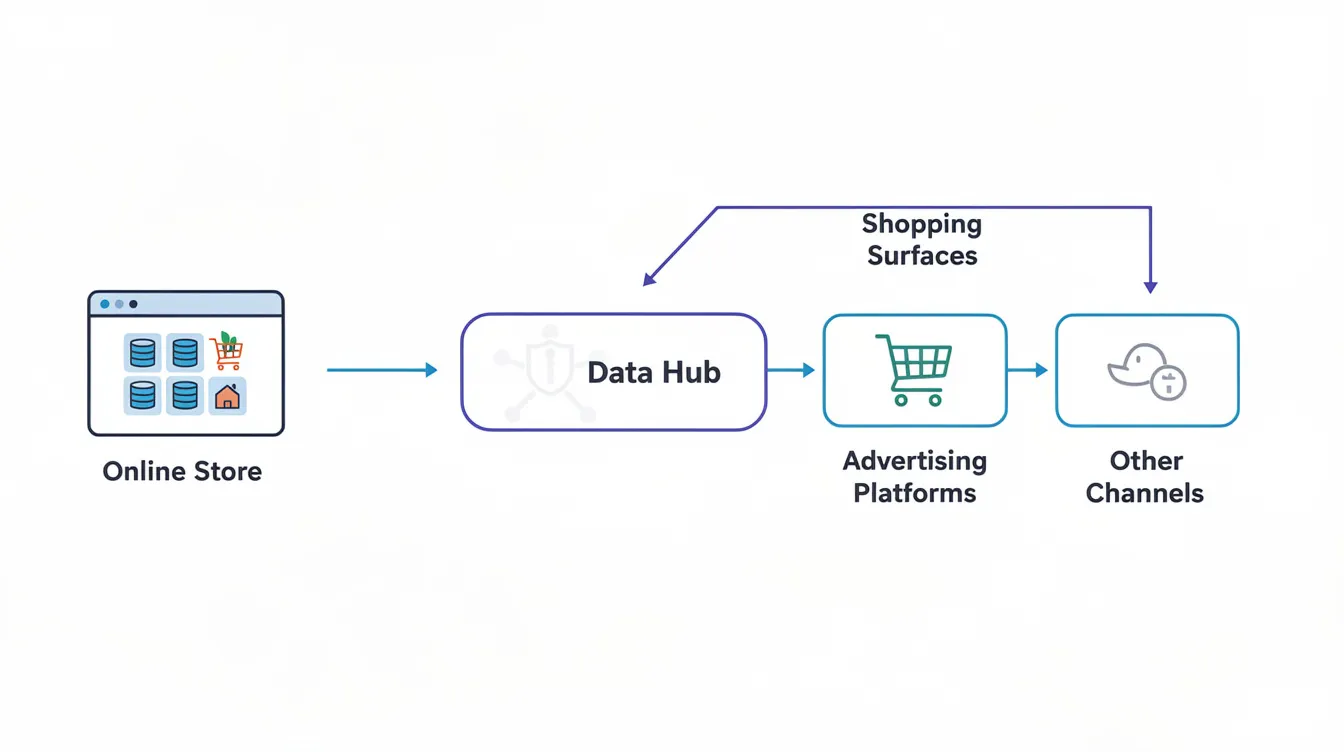
Google Merchant Center is Google’s central hub where you upload and manage your product data—titles, prices, images, availability, and attributes. It serves as the mandatory foundation for Shopping Ads, Performance Max campaigns, and Demand Gen formats.
GMC is not an ad platform itself. It’s the structured data source that Google Ads and Google surfaces (the Shopping tab, Google Search, YouTube, Google Images, and Google Maps) pull from to display your products. Without a properly configured merchant center account, your products simply won’t appear in these high-intent placements.
Here’s the reality: your ads are only as strong as your product feed. Even aggressive bidding strategies or large budgets cannot compensate for incomplete or poorly structured data. Industry analyses consistently show that 70–80% of underperforming Shopping and Performance Max accounts trace back to feed deficiencies rather than bid or budget constraints.
Better-structured feeds also support free product listings, helping Google understand your products for both paid performance and organic visibility. With Google’s 2025–2026 push toward AI-driven shopping experiences—including Gemini-powered recommendations—rich Merchant Center data has become a key signal for dynamic product carousels and AI overviews in search results.
How Google Merchant Center Powers Google Ads
Once GMC is linked to your Google Ads account, every product becomes an “ad-ready asset” that Google’s systems can match to user intent across Search, Shopping, YouTube, Discover, and Gmail. The quality of your feed determines how effectively Google can surface your products to potential customers as part of your broader advertising with Google for businesses strategy.
Google Shopping Ads
Google Shopping Ads match search queries to products automatically based on feed attributes—no traditional keyword bidding required. When customers search for “4K monitor under 300” or “buy running shoes size 10,” Google scans your titles, descriptions, product categories, prices, and availability to determine relevance.
Optimised titles dramatically impact performance. A weak title like “Running Shoes” captures far fewer impressions than “Nike Air Zoom Pegasus 40 Men’s Running Shoes Size 10 – Blue.” Data shows that weak titles lacking brand and key attributes result in 50% lower click-through rates on high-intent queries.
Accurate availability status and real-time pricing prevent the 15–25% disapproval rates common in mismatched feeds, keeping your products visible in Shopping carousels where local customers actively search to buy.
Performance Max Campaigns
Performance Max campaigns use Merchant Center product data as a core signal for AI automation. Your feed influences which queries trigger your products, which audiences see them, and which placements they appear on across Search, YouTube, Discover, and Gmail.
Asset groups in PMax are effectively “feed-powered.” High-quality titles, lifestyle images, and granular product types help Google’s AI decide which products to prioritise and where. Agency case studies report 30–60 day ROAS improvements from 2.5x to 5x after adding custom labels for margin tiers and excluding low-performers.
Poor feed quality doesn’t just hurt Shopping inventory within PMax—it undermines the system’s ability to generate relevant creatives and match them to the right users across all surfaces.
Demand Gen Campaigns
Demand Gen campaigns (which have replaced Discovery for many advertisers) rely heavily on compelling visuals and product relevance on YouTube, Discover, and Gmail to generate new demand at the top of the funnel.
Synced Merchant Center data fuels product-based creatives and carousels, making ads more shoppable even in upper-funnel placements. Feed elements like high-quality lifestyle images and descriptive titles help Demand Gen ads stand out, with studies showing 15–25% assisted conversion lifts from tailored visuals.
Think of Demand Gen plus GMC as your path from “intent capture” (Shopping) to “intent creation” (visual discovery)—using the same optimised product data.
Setting Up Google Merchant Center Correctly
This section provides a concise setup guide for those who may have rushed their original GMC configuration or are creating a new account, complementing more general guides on how to create Google Ads campaigns effectively.
Core setup steps:
- Create or log in with a Google Account at merchants.google.com
- Input business details (business name, business address, contact information matching your website)
- Verify and claim your website via HTML tag, DNS record, or Google Analytics
- Configure shipping tables and tax settings by region
- Opt into programs like free listings and Shopping Ads
- Link to your Google Ads account
Feed submission options:
- Use ecommerce platform integrations (Shopify, WooCommerce apps handle 90% of small businesses)
- Upload scheduled feeds from Google Sheets or XML (ideal for under 10k SKUs)
- Use the Content API for dynamic or large catalogues exceeding 50k items
Common setup mistakes to avoid:
- Mismatched prices between your online store and feed (causes 20–30% automatic disapprovals)
- Missing mandatory attributes like GTIN and brand for branded products
- Ignoring policy emails that can lead to account suspensions
- Selecting incorrect countries of sale, languages, or time zone settings
Product Feed Optimisation (Your Biggest Revenue Lever)
Once your merchant center is live, real gains come from systematic product feed optimisation—not constant campaign tinkering. Feed quality drives 60–70% of ad performance variance.
Every optimisation below ties back to measurable impact: higher CTR from better titles and images, lower CPC from improved relevance, and stronger conversion rates from clearer product positioning.
Product Titles
Product titles are the single most important feed field for Shopping and PMax. They heavily influence both query matching and user click decisions.
Recommended structure: Brand + Product Type + Key Attribute 1 (gender/age) + Key Attribute 2 (size/capacity) + Key Attribute 3 (colour/material)
Before and after examples:
| Before | After | Expected Impact |
|---|---|---|
| Women’s Winter Coat | Canada Goose Women’s Expedition Parka Size 10 Black Down Filled | 35% CTR gain, 2x impressions |
| Shoes | Adidas Ultraboost 22 Women’s Running Shoes Size 8 White/Grey | CTR from 0.5% to 2.1% |
| Incorporate real search terms from Search Terms reports and Google Search Console, but avoid keyword stuffing. |
Descriptions
Descriptions support relevance and long-tail query coverage. They should clarify use cases, core features, and unique selling points in natural language.
Keep descriptions readable for humans first while including secondary keywords like “waterproof winter coat” or “down insulated jacket for extreme cold.” Use short paragraphs or bullet-style sentences for scannability.
Avoid promotional language (“free shipping,” “best on the market”) in descriptions—route these to structured promotions instead to stay compliant with Google policies.
Images
High-quality images are critical across Shopping, PMax, and Demand Gen. They largely determine whether a shopper notices your specific product in a crowded carousel.
Google’s preferences:
- Clean background for primary image (white preferred)
- No text overlays, watermarks, or borders
- Minimum 100x100px, ideally 1024×1024 or higher
- Consistent aspect ratios to avoid cropping issues
Include at least one lifestyle image per product where possible, to support Demand Gen and upper-funnel placements where people search for inspiration.
Product Types & Google Product Categories
Product_type is your merchant-defined hierarchy (e.g., “Clothing & Accessories > Women’s Clothing > Coats & Jackets”) used for internal reporting and campaign structuring.
Google_product_category should follow Google’s taxonomy (over 5,000 categories) to help Google better understand your product and match it to relevant queries and Google surfaces.
Keep product_type granular and consistent—these values are extremely useful for campaign segmentation and PMax asset group organisation. Wrong or overly broad categories dilute relevance and hurt performance in competitive verticals.
Custom Labels
Custom labels (0–4) aren’t visible to users but are powerful for structuring advertising campaigns and bidding by strategy.
Practical label strategies:
- Margin tiers: “high_margin_30plus,” “low_margin_under10”
- Seasonality: “AW26,” “SS26,” “clearance”
- Performance: “bestseller_top100,” “new_arrival”
- Price bands: “under50,” “premium_200plus”
Using custom labels allows more aggressive bidding on high-margin or best-selling items, with agencies reporting 40% ROAS uplifts via margin-tiered structures. Plan labels collaboratively between marketing and finance teams to align ad spend with commercial priorities.
Advanced Strategies for Performance Max & Demand Gen
This section is for teams already running PMax or Demand Gen but looking to move beyond “set and forget” to a structured, feed-first optimisation approach.
A “feed-first strategy” means your product data, segmentation, and labels drive campaign structure—rather than the older keyword-first mindset. Your feed becomes the foundation for bidding, targeting, and creative generation.
Feed Segmentation and Campaign Structure
Rather than dumping all products into one PMax campaign, high-performing accounts segment by margin, brand, category, or lifecycle using product_type and custom labels.
Example structure:
| Campaign | Products | ROAS Target |
|---|---|---|
| PMax – Core Bestsellers | Top 20% by revenue | 5x |
| PMax – Long-tail Catalogue | Discovery products | 4x |
| PMax – Clearance | Low-margin, end-of-season | 3x |
| Base segmentation on 60–90 days of performance data sources, not guesswork. This approach yields 25–50% efficiency gains over monolithic setups, and many advertisers partner with Google Ads management services in Australia or similar agencies when they lack in-house expertise for this level of optimisation. |
Using Custom Labels for Bidding Control
Custom labels map directly into campaign or asset group filters in Google Ads. Use labels like “High_Margin,” “New_Season_2026,” or “Top_10_Rev” to create dedicated campaigns with more aggressive targets and budgets.
For example, a “Sale_30off” label can fuel a short-term promotion campaign with elevated impression share targets, pushing revenue without diluting core performers.
Excluding Low-Performing Products
Not all products deserve equal exposure. Some drain spend with few or no conversions.
Regularly analyse product-level performance in Google Ads and Merchant Center diagnostics. Identify SKUs with high spend but poor ROAS or zero conversions after 30 days. Exclude these using item ID filters, product_type, or custom labels.
Review exclusions quarterly—products may become viable again after price changes, product ratings improvements, or seasonality shifts.
Aligning Feed Optimisation with Audience Signals
In PMax and Demand Gen, audience signals work best when product data reflects the language and attributes that matter to those audiences.
Tailor titles and descriptions to emphasise benefits aligned with target segments: “eco-friendly vegan leather,” “compact design for small apartments,” or “pet-friendly fabric.” First-party data from CRM lists, combined with optimised feeds, helps PMax find more customers similar to high-value buyers.
Review search term reports and audience insights monthly to refine both feed content and signals for reaching potential customers.
Common Google Merchant Center Issues That Hurt Performance
Think of this as your “hidden revenue leakage checklist”—problems that often sit unnoticed in Diagnostics but quietly cap scale and profitability.
Many advertisers try to fix poor performance with bid changes while hundreds of products are disapproved or limited by data quality issues. Check GMC Diagnostics weekly for errors, disapprovals, and warnings.
Disapproved Products and Policy Violations
Policy violations—misrepresentation, prohibited content, unclear returns—can lead to individual product disapprovals or account suspensions.
Review policy-related messages in GMC and address them quickly. Document changes in case an appeal is needed. Disapproved products generate zero impressions, meaning potential revenue from those SKUs is completely blocked.
Common pitfalls include inaccurate shipping information, promotional text in image overlays, and mismatched product details between feed and website.
Misaligned Pricing and Availability
Mismatches between feed price/availability and on-site data cause disapproval and erode trust. Slow feed updates or caching issues are typical culprits.
Implement frequent or real-time feed updates, especially for stores with dynamic pricing or fast-moving inventory. Google’s automated item updates and schema markup provide secondary safeguards, but they aren’t substitutes for a clean feed.
Repeated pricing mismatches trigger stricter reviews and reduced eligibility, impacting Shopping and PMax coverage.
Missing Identifiers and Weak Titles
Missing GTINs, brands, or MPNs reduce competitiveness, particularly in categories where Google expects them (electronics, branded retail). Providing GTINs helps Google match your product to existing catalogues, improving impression share and eligibility for rich formats.
Generic or truncated titles limit query coverage and lower CTR, wasting potential impressions. Run a quick audit: export your feed, check GTIN and brand coverage, and list products with the shortest titles as your top optimisation priority—this is how you add products that actually convert.
Key Takeaways
Google Merchant Center is not just a technical requirement—it’s the strategic engine powering Shopping, Performance Max, and Demand Gen performance for businesses that sell online.
Feed optimisation (titles, images, categories, custom labels, identifiers) usually delivers bigger gains than constant bid or budget changes alone. Ongoing diagnostics checks and structured feed segmentation prevent revenue leakage from disapprovals, poor data quality, and unprofitable products.
Adopt a feed-first mindset: plan campaign structure, bidding, and creatives around a deliberately segmented and optimised product catalogue. This free tool from Google becomes powerful when treated as an ongoing optimisation channel rather than a set-and-forget setup.
If your Shopping or Performance Max results aren’t where they should be, prioritise a Merchant Center and feed audit before increasing ad spend or expanding ad campaigns. Your product feed is likely the missing piece.
FAQ
This FAQ addresses practical questions performance marketers often have about Google Merchant Center and feed optimisation beyond the core guide above.
Do I need Google Merchant Center if I’m already running Search campaigns?
Standard Search campaigns can run without GMC. However, Shopping Ads, Performance Max campaigns, and most Demand Gen ecommerce formats require a Merchant Center product feed. Adding GMC unlocks richer ad formats on Google search results and can deliver 2–3x revenue compared to text ads alone for product-based businesses using third-party platforms or their own online store.
How often should I update my product feed in Google Merchant Center?
For most e-commerce stores, daily updates are recommended. Stores with fast-changing inventory or dynamic pricing should use near real-time or Content API-based updates. Prices and availability must always match your website to avoid disapprovals that block your products from the Google Shopping tab and other placements.
Can I use one Merchant Center account for multiple countries?
Yes. A single GMC can target multiple countries of sale. You’ll need correct currencies, languages, and shipping settings per country within your account settings. Many advertisers create separate feeds or campaigns for localisation and performance control, particularly when using local inventory ads for physical store locations.
What’s the difference between free listings and Shopping Ads in Merchant Center?
Free product listings are unpaid placements on the Shopping tab and other Google services, while paid product listings (Shopping Ads) are managed through Google Ads with bidding and budgets. Both use the same product feed, but Shopping Ads offer more control over visibility and can reach local customers with high purchase intent more aggressively.
When should I move from basic Shopping campaigns to Performance Max?
Advertisers with solid, well-optimised feeds and sufficient conversion volume (typically 50+ conversions per month) often benefit from PMax’s automation across YouTube, Discover, and Search. Those still fixing feed issues—weak titles, missing identifiers, policy violations—should stabilise standard Shopping first. Poor feeds amplify PMax’s automation flaws rather than improving them, as the system relies on your product data as its primary input for reaching more customers.
Sorry, the comment form is closed at this time.